
Best Mac Apps of 2026: Productivity Picks by Use Case
Last reviewed: August 2026
Pricing, macOS compatibility, and notable feature changes were rechecked for this update, including the 1Password price increase and the macOS 27 announcements from WWDC.
Picking the best Mac apps of 2026 gets easier once you stop asking for one perfect app and start matching the tool to the job. The bigger shift this year is that Mac software is no longer just about lists and reminders. More apps now blend planning, focus control, and AI assistance, reflecting a wider move from simple time management toward capacity-aware workflows, as noted in Rivva’s 2026 analysis.
Start with the table. It maps each must-have Mac app to the specific problem it solves, so you can skip straight to the one you need.
| If You Need | Best Pick | Why It Stands Out |
|---|---|---|
| Best overall Mac app | Chronoid | Automatic time tracking, private AI insights, and built-in focus tools in one native Mac app |
| Best free Mac app | Notion | Generous free plan for docs, tasks, notes, and databases |
| Best Mac app for developers | Raycast | Fast launcher, deep extensions ecosystem, and strong keyboard-first workflow |
| Best Mac app for students | Obsidian | Local-first notes, backlinks, and plugin flexibility for study systems |
| Best Mac app for freelancers | Chronoid | Automatic work logs, distraction tracking, and clearer billing visibility |
Try Chronoid for Mac
See where your time goes, stay focused, and keep your data private.
Quick chooser
- You want automatic tracking without manual timers: Pick Chronoid. It is the best fit if you want a native Mac app that runs, shows where time went, and includes focus tools in the same place. Skip it if you need team timesheets or cross-platform support.
- You work almost entirely from the keyboard: Pick Raycast. It is excellent for developers, operators, and anyone who wants launching, snippets, window actions, and app commands in one fast layer. Skip it if you do not want to spend time customizing commands and extensions.
- You want calm personal task management on Apple devices: Pick Things. It is the best choice for individuals who value polish, quick capture, and a clean Today view more than collaboration. Skip it if you need a web app, Windows access, or shared team projects.
- You need a flexible notes-and-projects system: Pick Notion. It works well if your tasks, docs, meeting notes, and lightweight databases need to live together. Skip it if you prefer local files, instant startup, or a low-maintenance setup.
- You need cross-platform tasks for work and personal life: Pick Todoist. It is the easiest recommendation for people moving between Mac, iPhone, browser, and Windows machines. Skip it if you mainly want a native Apple experience.
For readers comparing the best Mac apps 2026 and the best productivity apps for Mac, the most useful split is not “best overall” versus “runner-up.” It is whether you need tracking, planning, notes, or speed. I kept returning to that distinction while updating this list because several strong apps overlap on paper but feel very different after a week on macOS.
How We Tested These Mac Apps
This list was re-verified in July 2026. We started with 37 Mac apps across time tracking, tasks, launchers, notes, calendars, focus tools, window management, and password/security utilities, then narrowed the list to 12 based on hands-on testing and day-to-day usefulness on macOS.
The practical checks were simple but strict: install on a current Mac setup, evaluate startup speed, background behavior, menu-bar clutter, offline reliability, and how fast the app becomes useful without heavy configuration. Checks also included whether each tool felt at home on macOS or behaved like a thin wrapper around a web app. If product changes could affect ranking, consult official pricing or update pages, including Notion pricing, Raycast pricing, and 1Password release notes.
The ranking was decided by a mix of usefulness, Mac fit, and tradeoffs. A powerful app did not rank highly if it was too heavy, too expensive for its audience, or awkward in normal Mac workflows. I gave extra weight to tools that save time without constant babysitting, because that is where the best mac productivity apps usually separate themselves from merely capable ones.
On Mac specifically, six criteria mattered most:
- Native performance: fast launch, smooth scrolling, good keyboard support, and low friction on Apple silicon.
- Menu-bar and background behavior: whether the app stays helpful without becoming noisy, battery-hungry, or memory-heavy.
- Offline support: important for flights, campus Wi-Fi, and anyone who wants work to continue without cloud dependency.
- Apple ecosystem integration: Calendar, Shortcuts, Reminders, iCloud, Touch ID, Apple Watch, and system-level sharing all mattered.
- Privacy defaults: especially for trackers, notes, and password tools.
- Recent pricing or feature changes: because a ranking from 2025 can become misleading if a plan changed, an AI feature moved behind a paywall, or a major macOS update altered the experience.
That last point mattered more than usual in 2026. The category is shifting toward layered stacks rather than one app doing everything, with tracking, planning, focus, and habits often handled by separate tools, a pattern highlighted in Flowlu’s 2026 guide. At the same time, focus protection has become a core part of real-world productivity software rather than an afterthought, which lines up with AppBlock’s 2026 comparison. One reason Chronoid, Raycast, and Rectangle score well here is they reduce friction on Mac immediately, not just in theory.
1. Chronoid
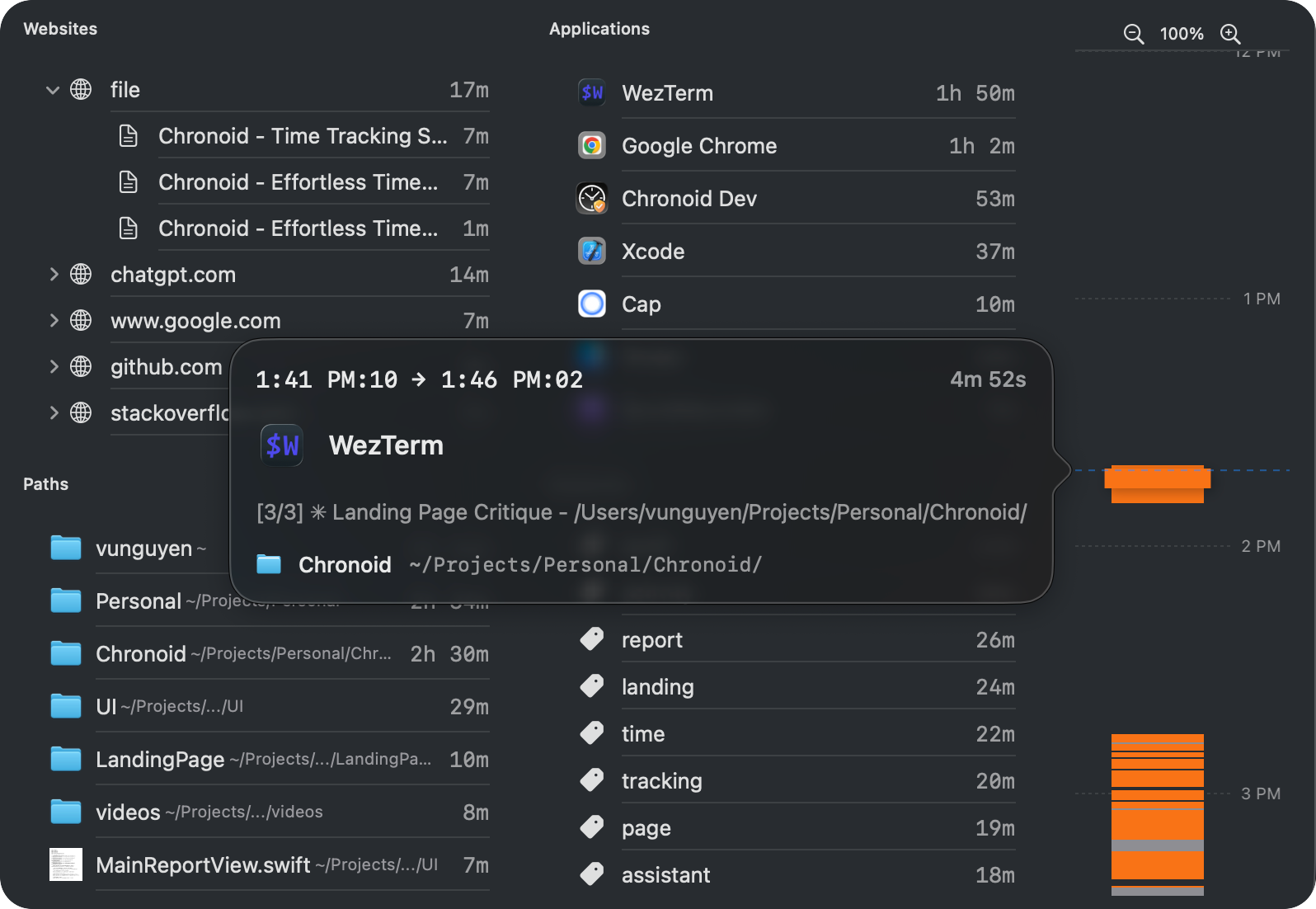
Chronoid stands out as one of the best productivity apps for Mac by combining effortless, automatic time tracking with powerful, AI-driven insights and built-in focus tools. It operates in the background, logging every app, website, and document you use without requiring you to start or stop a timer. This “set it and forget it” approach eliminates the manual effort of traditional time tracking, providing a completely accurate picture of your digital habits.
Its core strength lies in making this data useful. An on-device AI chat allows you to ask natural language questions like, “How much time did I spend on Project X last week?” or “What were my biggest distractions on Monday?” to get instant answers. This transforms raw data into actionable intelligence, helping you identify productivity patterns and reclaim your focus.
Why we ranked Chronoid #1: it combines automatic time tracking, AI-powered insights, and focus tools in one native Mac app, so you can understand your habits and improve them without stitching together multiple tools.
Best Mac productivity app for automatic tracking
See where your time goes, then fix the leaks.
Download Chronoid’s free trial to automatically track apps, websites, and documents on your Mac. You get a real breakdown of focused work vs distractions, plus a built-in Pomodoro timer and website blocker.
Key Strengths & Use Cases
Chronoid excels by integrating features that often require multiple separate applications. The built-in focus suite, including a website blocker and Pomodoro timer, lets you act on the insights you discover without leaving the app. For freelancers, the automatic logging provides an undeniable record for billing. For students, it helps structure study time and minimize digital diversions.
Privacy is a top priority, with all data processed locally on your Mac by default. For those who want to learn more about the benefits of this approach, Chronoid offers a detailed guide on time tracking on a Mac. This local-first design ensures your activity data remains confidential.
Key Features:
- Automatic Time Tracking: No timers to manage; records all app, website, and document usage.
- AI-Powered Insights: On-device chat and automatic categorization to understand your habits.
- Integrated Focus Tools: Includes a website blocker, scheduled focus sessions, and a Pomodoro timer.
- Privacy-First Design: All activity data stays on your device by default.
Pricing: Chronoid offers a full-featured 7-day free trial. A lifetime license is available for a one-time purchase.
| Pros | Cons |
|---|---|
| ”Set and forget” automatic tracking is completely frictionless. | macOS only (requires macOS 14+). |
| On-device AI provides powerful, private insights without cloud sharing. | Lacks native features for multi-user team timesheets. |
| All-in-one suite replaces separate time tracker and focus apps. | |
| Privacy-first architecture ensures data stays on your Mac. |
Website: Chronoid
2. Notion
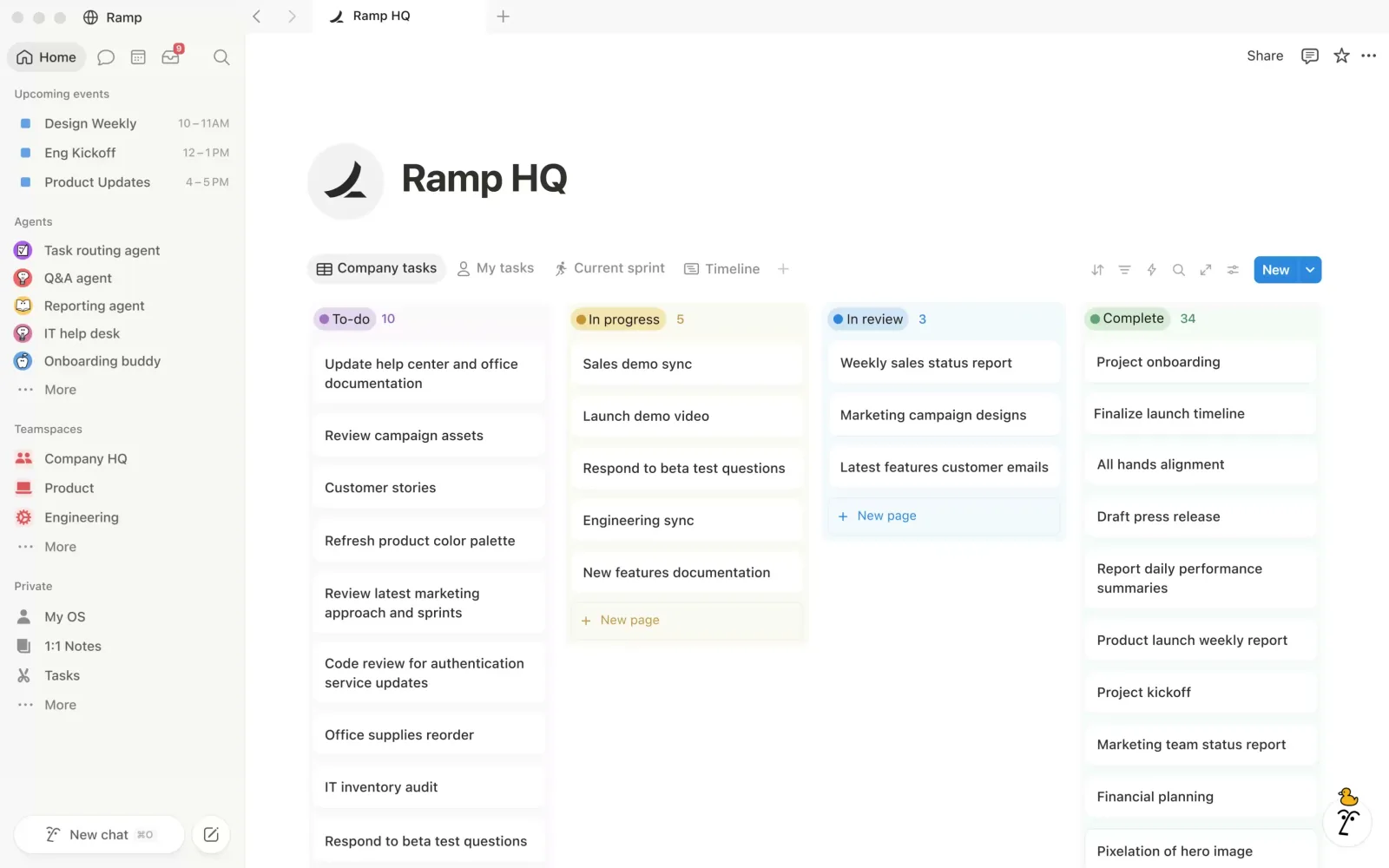 Screenshot: notion.com, July 2026
Notion remains one of the easiest recommendations when your work is spread across notes, lightweight project management, meeting docs, and reference pages. Its main advantage on Mac is not that it feels the most native in this list; it is that it reduces app-switching. If one workspace can hold task databases, team docs, personal notes, and AI summaries, many users will tolerate a bit of extra overhead.
What improved its standing for 2026 is how much more useful the AI layer has become for turning raw information into action. Rivva’s 2026 review specifically calls out Notion AI for generating tasks from meeting notes and automating workflow steps in ways older note apps did not attempt in its 2026 roundup. In practice, that makes Notion strongest for people who want one system for planning and documentation, not just a better text editor.
Where Notion fits best on Mac
Notion works best for students, founders, content teams, and ops-heavy roles that need structure but do not want a separate app for every job. In my testing, it was especially good for turning scattered weekly planning into one visible dashboard: a meeting note could become an action list, then a project board, without moving data between apps. The tradeoff showed up in startup feel and navigation. Large workspaces still opened slower than local-first note tools, and jumping between dense databases felt less fluid than in lighter Mac-native apps.
A second pattern from testing was that Notion works best when you accept its all-in-one logic rather than forcing it to behave like a simple notes app. For example, it handled weekly planning well when tasks, docs, and reference material lived together, but it felt heavier for quick capture than Bear or Obsidian. That is why I rate it highly for mixed planning-and-documentation workflows, but not as the cleanest daily driver for users who mainly want fast notes.
- Flexible Block Editor: Mix text, tables, databases, embeds, and media in any combination to build custom workflows.
- Connected Databases: Create relational databases with views (table, board, calendar, timeline, gallery) to manage projects, CRMs, and content calendars.
- AI-Powered Assistance: Built-in AI can draft content, summarize meeting notes, auto-fill database properties, and answer questions across your workspace.
- Templates & Teamspaces: Thousands of community templates plus private teamspaces for organized collaboration.
- Cross-Platform Sync: Real-time sync across Mac, iOS, Android, and web with offline support on desktop and mobile.
Pricing: Free for personal use. Plus plan at $10/month per seat. Business plan at $20/month per seat, as listed on the official pricing page.
| Pros | Cons |
|---|---|
| Extremely flexible — replaces multiple tools in one platform | Can feel overwhelming for users who want simple notes |
| Powerful database and project management capabilities | Performance can lag on very large workspaces |
| Generous free tier for personal use | Business plan pricing increased recently ($15 → $20/mo) |
| Built-in AI eliminates the need for separate AI writing tools |
Visit the Notion website
3. Alfred
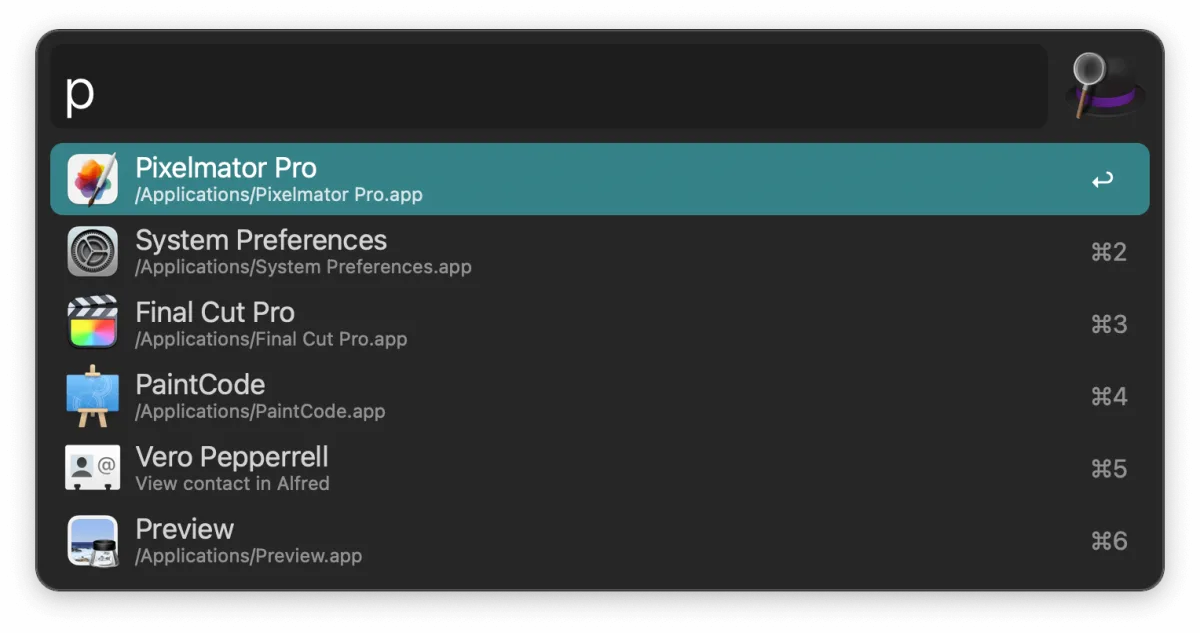 Screenshot: alfredapp.com, July 2026
Alfred remains one of the smartest long-term purchases for Mac users who prefer speed over visual complexity. Its core launcher is already fast, but its biggest benefits appear once clipboard history, snippets, and workflows become muscle memory. That changes how you move through macOS more than almost any single-purpose app.
I still rate Alfred highly because it rewards gradual investment. You do not need to master workflows on day one. Even basic commands, app launches, and snippet expansion save enough friction to justify it for heavy Mac users. It loses ground to Raycast for users who want a more modern default experience and richer built-in integrations, but Alfred remains excellent if you prefer a one-time purchase and deep control.
Key Features & User Experience
In testing, Alfred felt best once I leaned into repeat actions rather than using it only as a Spotlight replacement. A few saved snippets, clipboard history, and file actions quickly removed small delays that add up over a workday. That made Alfred especially strong for users who repeat the same commands, links, or text blocks all day.
The friction point is setup. Compared with Raycast, Alfred asks more from you before its benefits are obvious. The payoff is control: workflows can be tuned very precisely, and that matters for users who want to shape the launcher around their habits instead of adapting to a preset ecosystem.
- Fast Universal Search: Launch apps, files, or run system actions in milliseconds.
- Powerpack Workflows: Create or import custom automations without writing scripts.
- Clipboard History & Snippets: Access past clippings and reusable text snippets instantly.
- Community Gallery: Browse thousands of user-made workflows, themes, and extensions.
- One-Time License: Pay once with no ongoing subscription.
Pricing: Free core app. Powerpack single license at £34. Mega Supporter with free lifetime upgrades at £59.
| Pros | Cons |
|---|---|
| One-time license with optional lifetime upgrade tier | Powerpack sold outside Mac App Store in GBP only |
| Deep customization and extensibility for power users | Learning curve to master complex workflows |
| Active community gallery for sharing and discovering automations | Some overlap with built-in macOS Shortcuts |
Visit the Alfred official site
4. Raycast
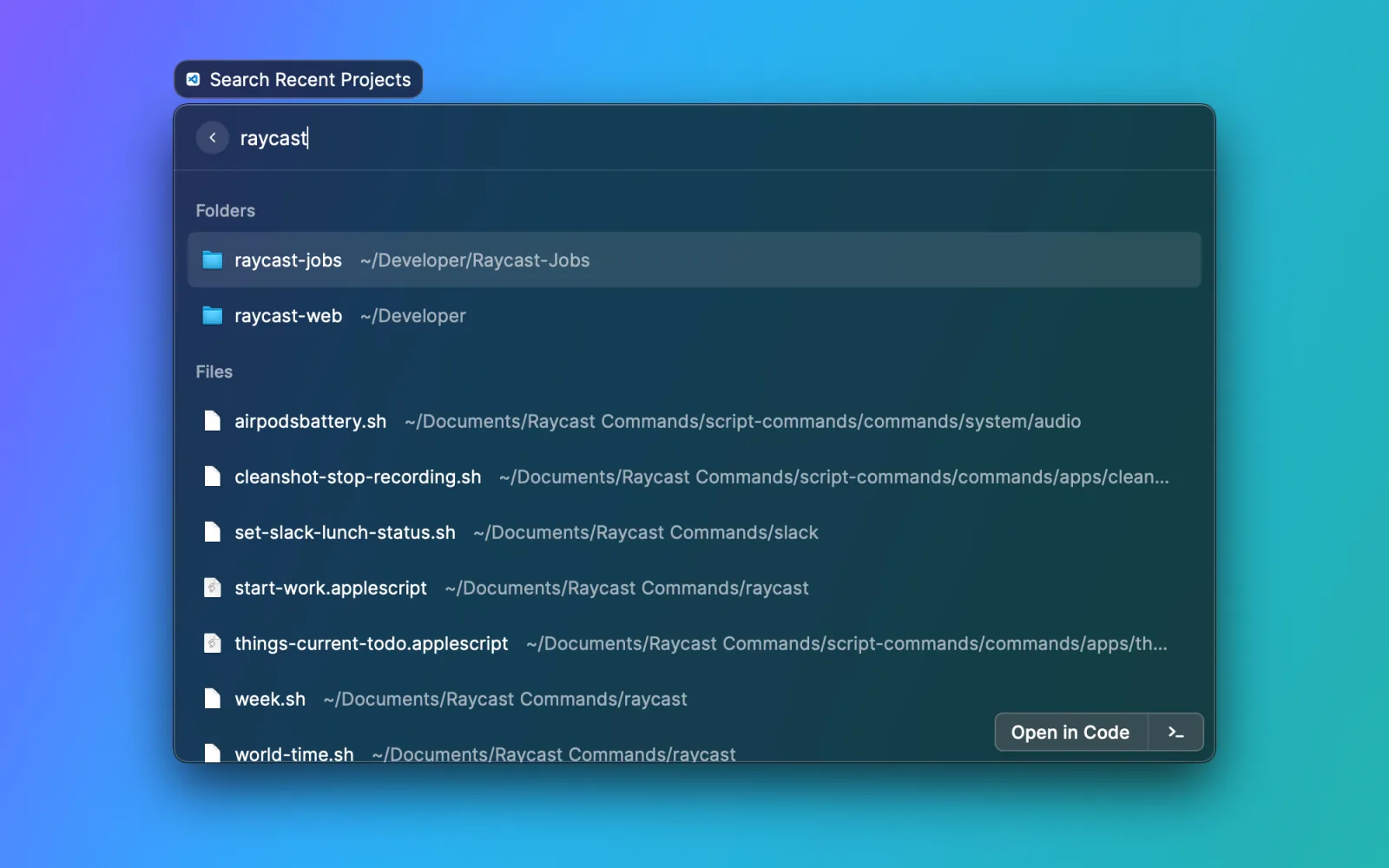 Screenshot: raycast.com, July 2026
Raycast is a modern, developer-friendly launcher that has rapidly become the go-to Spotlight replacement for professionals. It combines app launching, clipboard history, window management, snippets, and an extensible command palette into one keyboard-driven interface. What sets Raycast apart is its thriving extensions ecosystem — with thousands of community-built extensions for GitHub, Jira, Linear, Slack, and more.
The free tier covers everything most individuals need. Pro plans add cloud sync, team command sharing, and an optional AI integration that lets you chat with models directly from the launcher. Raycast’s speed and polish have made it indispensable for developers and teams who live in the keyboard.
Key Features & User Experience
- Extensible Launcher: Search apps, files, and system commands with keyboard-driven speed.
- Window Management: Tile, move, and resize windows using keyboard shortcuts or command palette.
- Extensions Ecosystem: Thousands of community and first-party extensions for developer tools and SaaS apps.
- Clipboard History & Snippets: Store and retrieve text, links, and code snippets with ease.
- Team Cloud & AI: Sync custom commands across teams and use AI directly from the launcher (Pro).
Pricing: Core features free. Pro plan at $8/month (billed annually) with cloud sync, AI, and team features.
| Pros | Cons |
|---|---|
| Robust free tier covers everyday workflows | Some advanced features require a paid subscription |
| Rapidly growing ecosystem with community extensions | Initial setup and customization demand time investment |
| Built-in window management eliminates need for a separate app | macOS only (requires macOS Big Sur or later) |
Visit the Raycast website
5. Things
 Screenshot: Mac App Store, July 2026
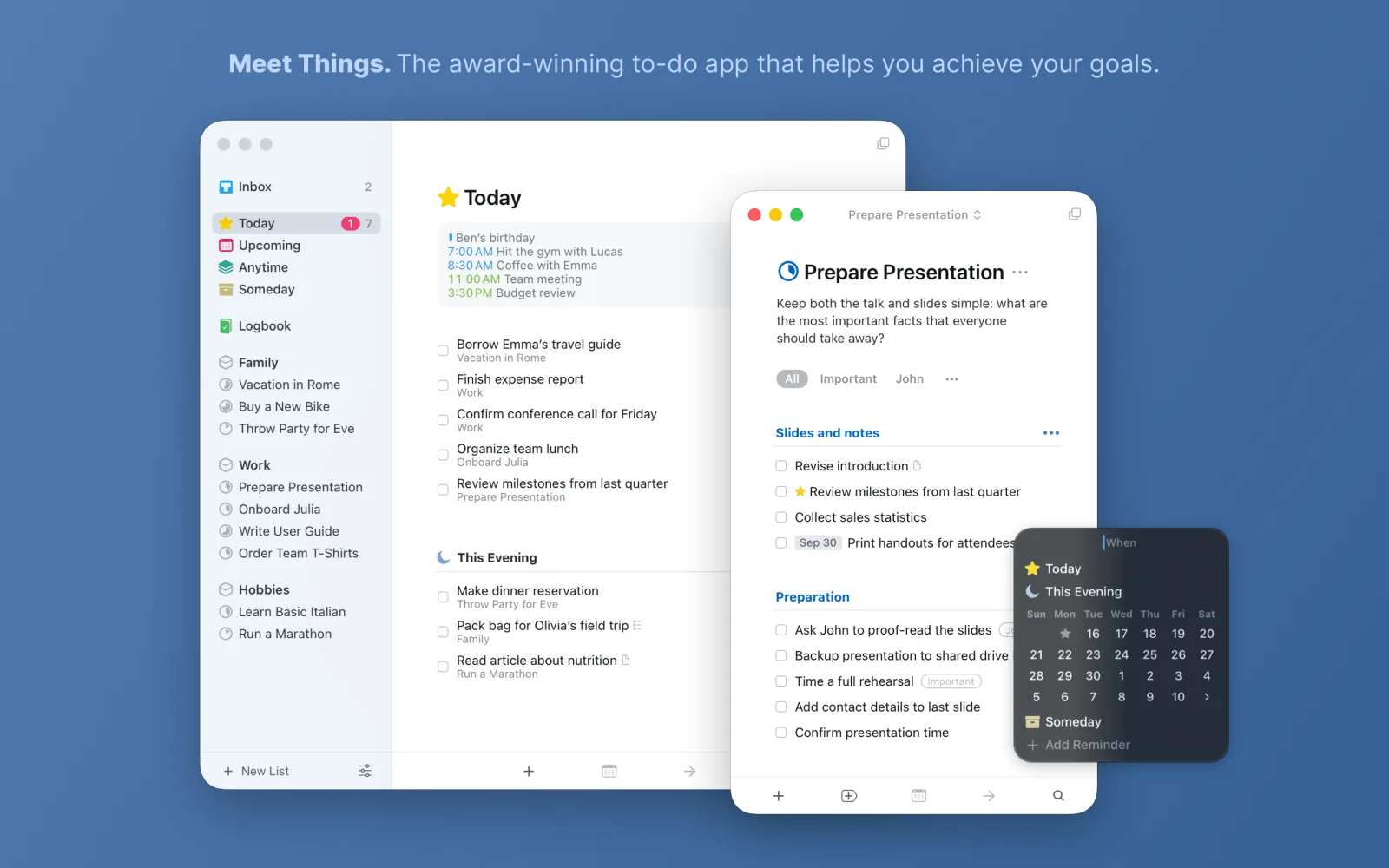
Things remains near the top because it understands what many Mac users want from task management: not maximum power, but minimum resistance. It is fast, visually calm, and unusually good at helping you decide what matters today without drowning you in options.
Its biggest strength is taste. That sounds vague until you compare it with busier task apps. The hierarchy of Areas, Projects, and headings is enough for most personal systems, and the interface rarely gets in the way. The tradeoff is obvious: if you need collaboration, browser access, or a shared team workflow, Things is the wrong tool.
Key Features & User Experience
In daily use, Things kept earning its rank through low-friction moments: quick entry was fast, the Today view stayed readable even after adding several projects, and planning upcoming work felt lighter than in more configurable task managers. It also did a better job than Todoist or OmniFocus at making me want to review tasks on Mac, because the interface rarely felt crowded.
The limitation became clearer when I tested beyond solo use. Sharing was the wall. Once a workflow needed handoff, comments, or access from a browser on another machine, Things stopped being flexible and started feeling intentionally closed. That is not a flaw if you want a personal Apple-only system; it is a real constraint if your work moves outside that boundary.
- Clean, Keyboard-Driven Interface: Rapid task entry and navigation with extensive shortcuts.
- Deep Apple Integration: Calendar views, Reminders import, and Shortcuts support.
- One-Time Purchase: No subscriptions — pay once per device.
- Rich Tagging & Project Hierarchy: Organize complex task structures with areas, projects, headings, and tags.
- Reliable Cloud Sync: Fast, free sync across Mac, iPhone, iPad, and Apple Watch via Things Cloud.
Pricing: Mac app $49.99, iPad $19.99, iPhone $9.99 (one-time purchases).
| Pros | Cons |
|---|---|
| Beloved user experience with consistent, polished UI | Separate purchase required for each Apple platform |
| No subscriptions — pay once per device | No official web app or cross-platform collaboration layers |
| Stable, frequent updates timed with macOS features | Lacks real-time team sharing or assignment tools |
Visit the Things website
6. OmniFocus
 Screenshot: omnigroup.com, July 2026
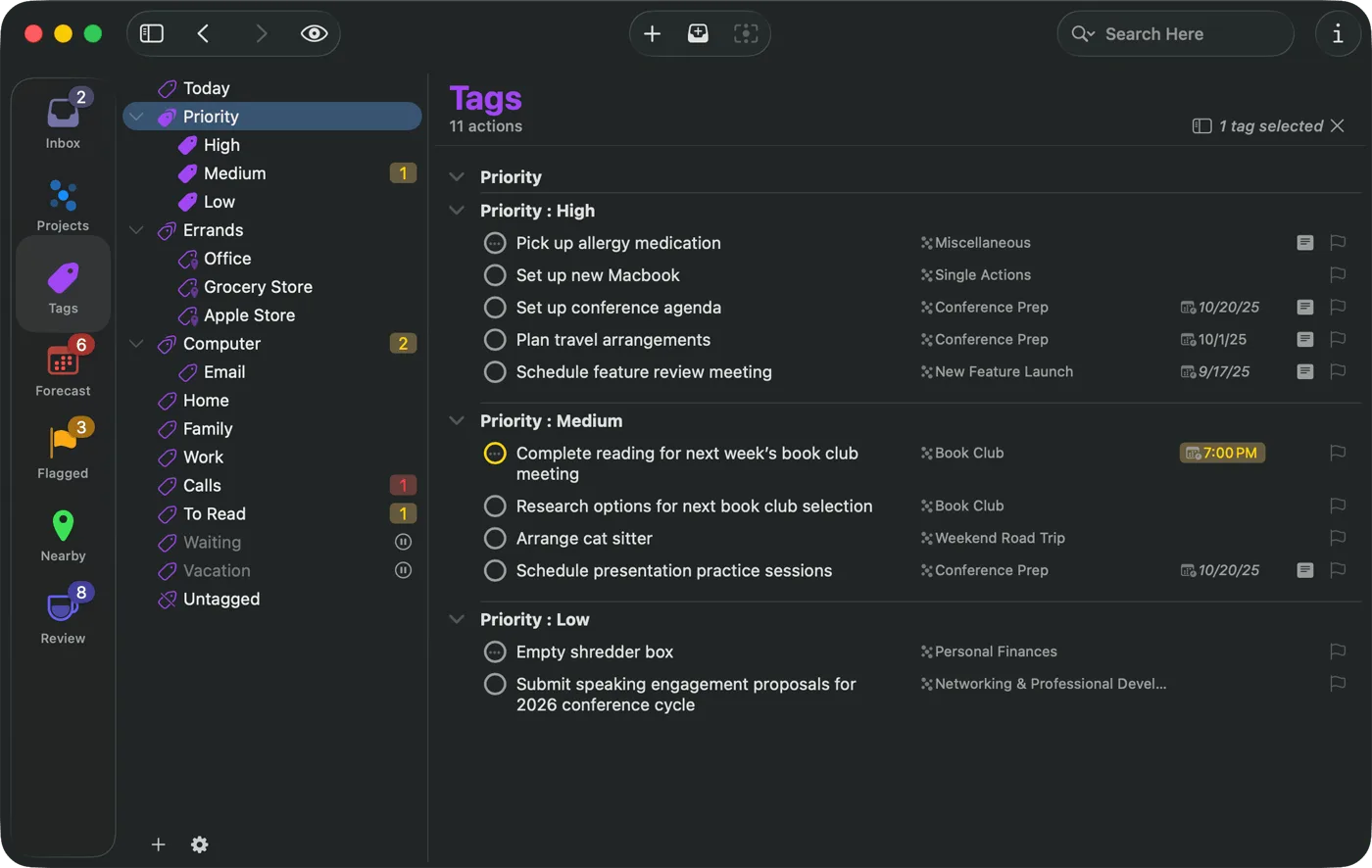
OmniFocus remains the strongest option here for people who want a serious GTD system and are willing to earn it. It is not the easiest app on this list, and that is fine. Its audience is people with layered projects, deferred tasks, recurring review systems, and strong opinions about task structure.
The app earns its place because custom perspectives, review tools, and automation still go deeper than most competitors. In my testing, OmniFocus felt best when work was complex enough to justify the setup. For a simple personal checklist, it is overbuilt. For a heavy planning system, it is still one of the most capable Mac-native options available.
Key Features & User Experience
What stood out in testing was not just depth, but the way OmniFocus handles review-heavy systems. Once projects had defer dates, repeating tasks, and custom perspectives, it became much easier to separate what exists from what needs attention now. That made it stronger than Things or Todoist for users running a true GTD-style setup rather than a lighter daily list.
The cost of that power is cognitive load. Initial capture is not as effortless as in Things, and the interface asks you to understand its structure before it pays off. I would not push OmniFocus on casual users, but for people with nested commitments and a habit of weekly reviews, it still solves a level of complexity the simpler apps do not.
- GTD-Style Management: Projects, contexts (tags), review loops, and defer/due dates.
- Custom Perspectives: Build saved views that filter and sort tasks exactly how you need.
- Cross-Platform Sync: Omni Sync Server plus web access with subscription.
- Automation: AppleScript, Shortcuts, and URL schemes for deep integration.
- Flexible Licensing: Subscription ($9.99/month or $99.99/year) or standalone purchase.
Pricing: Subscription at $9.99/month or $99.99/year (includes Pro on all devices + web). Standalone licenses also available.
| Pros | Cons |
|---|---|
| Most powerful GTD implementation on any platform | Higher cost than simpler task managers |
| Custom perspectives offer unmatched flexibility | Steep learning curve for GTD beginners |
| Subscription includes web access and all platforms | Overkill for users with simple task needs |
Visit the OmniFocus website
7. Todoist
 Screenshot: Mac App Store, July 2026
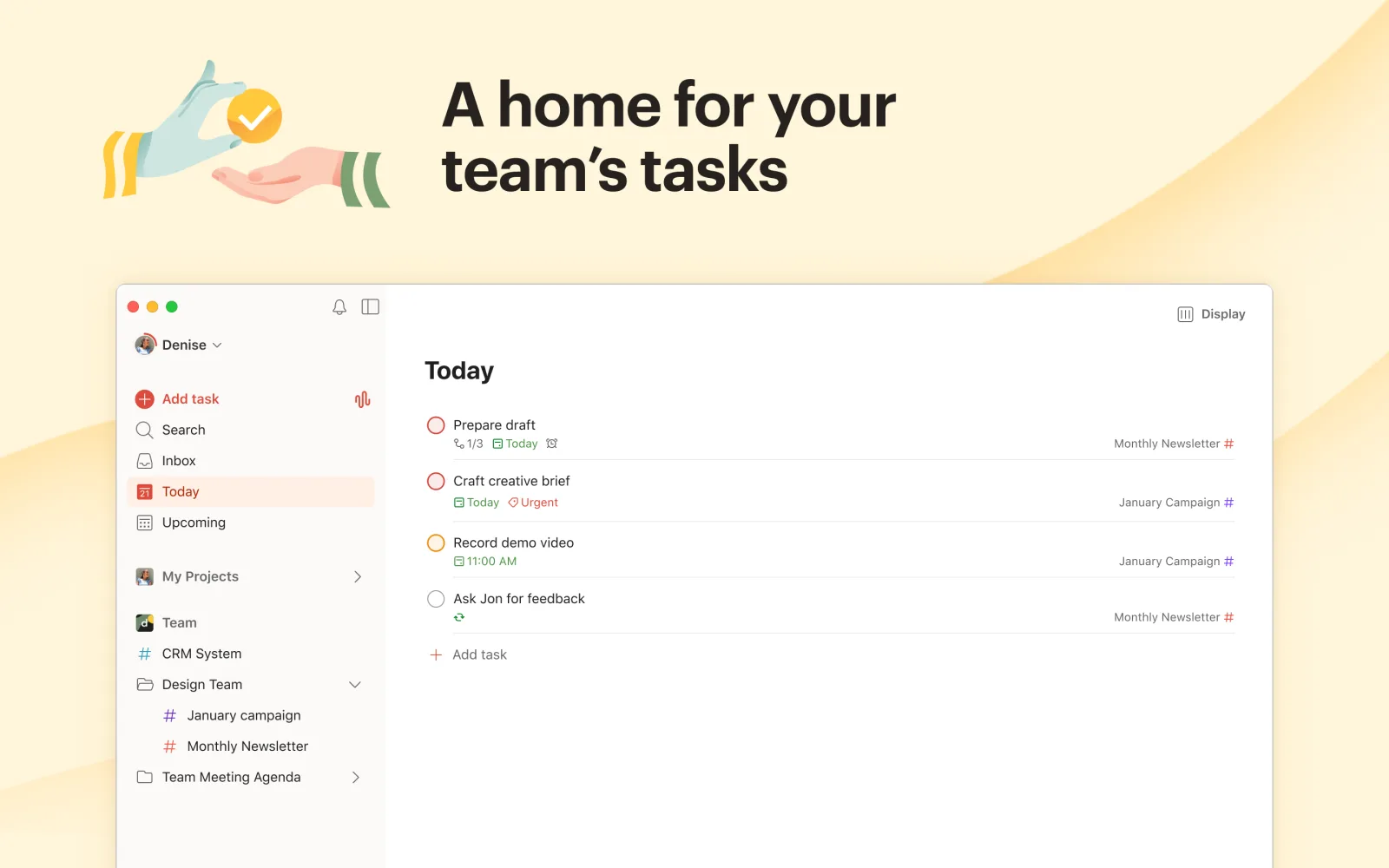
Todoist is still the safest recommendation when your task system has to work everywhere. It gives up some Apple-specific polish compared with Things, but the trade is worth it for people who move between Mac, browser, phone, and other operating systems.
What keeps Todoist relevant in 2026 is balance. It is easier to adopt than OmniFocus, more structured than basic reminders apps, and better for mixed-device life than Apple-only choices. Flowlu’s 2026 overview still highlights specialized planning layers and time accountability as separate needs, which helps explain why Todoist works best as the task layer in a broader stack rather than the only app you use in its category guide.
Key Features & User Experience
In testing, Todoist kept proving its value when work moved between contexts. I could capture a task on Mac, adjust it later in a browser, and still trust the system to stay coherent. That made it much easier to recommend than Things for anyone who does not stay inside Apple hardware all day.
Its main friction on Mac is that it feels competent rather than delightful. Natural-language input is useful, and shared projects are easier here than in most personal task apps, but the experience is less calm than Things and less customizable than OmniFocus. It ranks highly not because it wins on feel; it wins on flexibility without becoming too complex.
- Natural Language Input: Fast task creation with automatic date, project, and priority parsing.
- Filters & Labels: Custom views to sort tasks by priority, project, label, or date.
- Cross-Platform Sync: Reliable sync across Mac, mobile, web, and desktop apps.
- Team Workspaces: Shared boards, project templates, comments, and file sharing.
- Integrations & Automation: Connects with 80+ apps via native integrations, Zapier, and IFTTT.
Pricing: Free tier (up to 5 active projects). Pro at $4/month. Business at $6/month per user.
| Pros | Cons |
|---|---|
| Balance of simplicity and power with a clean interface | Premium features require a paid subscription |
| Reliable sync across every major platform | Less native feel compared with Mac-only tools like Things |
| Strong free tier for individuals | No built-in calendar view on the free tier |
Visit the Todoist website
8. Fantastical
 Screenshot: Mac App Store, July 2026
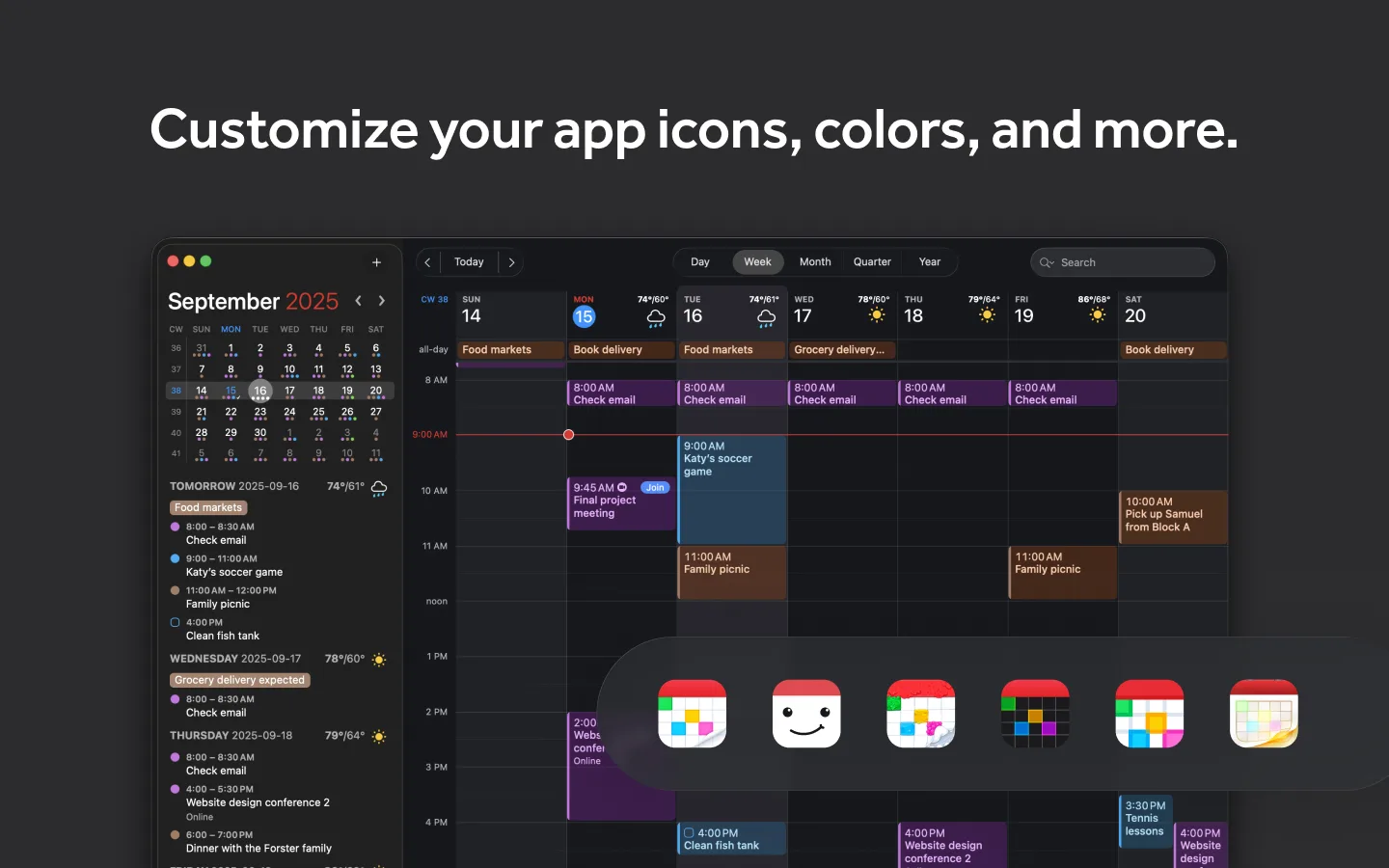
Fantastical is still the calendar app to beat if your bottleneck is scheduling friction. Natural-language entry remains excellent, and the Mac app feels polished enough that even simple calendar work becomes faster.
Its value depends on how calendar-heavy your work is. If meetings, availability, and rapid event entry shape your day, Fantastical earns its subscription. If you only need a basic calendar, Apple Calendar is better than it used to be and makes Fantastical feel more premium than essential.
Key Features & User Experience
- Natural-Language Event Creation: Type events in plain English and watch them auto-populate.
- Powerful Calendar Views: Day, week, month, and year layouts with color-coded event types.
- Scheduling Links & Templates: Share custom booking pages and save common invites as templates.
- Built-In Tasks: Manage to-dos alongside your calendar without a separate app.
- Cross-Platform Sync: Instant updates via iCloud or Flexibits Cloud across Mac, iPhone, iPad, Apple Watch, and Windows.
Pricing: Free tier with basic features. Individual plan at $6.99/month or $56.99/year. Family plan at $10.49/month or $89.99/year.
| Pros | Cons |
|---|---|
| One subscription unlocks Fantastical and Cardhop everywhere | No perpetual license option |
| Natural-language parsing is best-in-class | Full feature set requires premium subscription |
| Deep Apple ecosystem integration with reliable sync | Scheduling links limited to higher tiers |
Visit the Flexibits website
9. Obsidian
 Screenshot: obsidian.md, July 2026
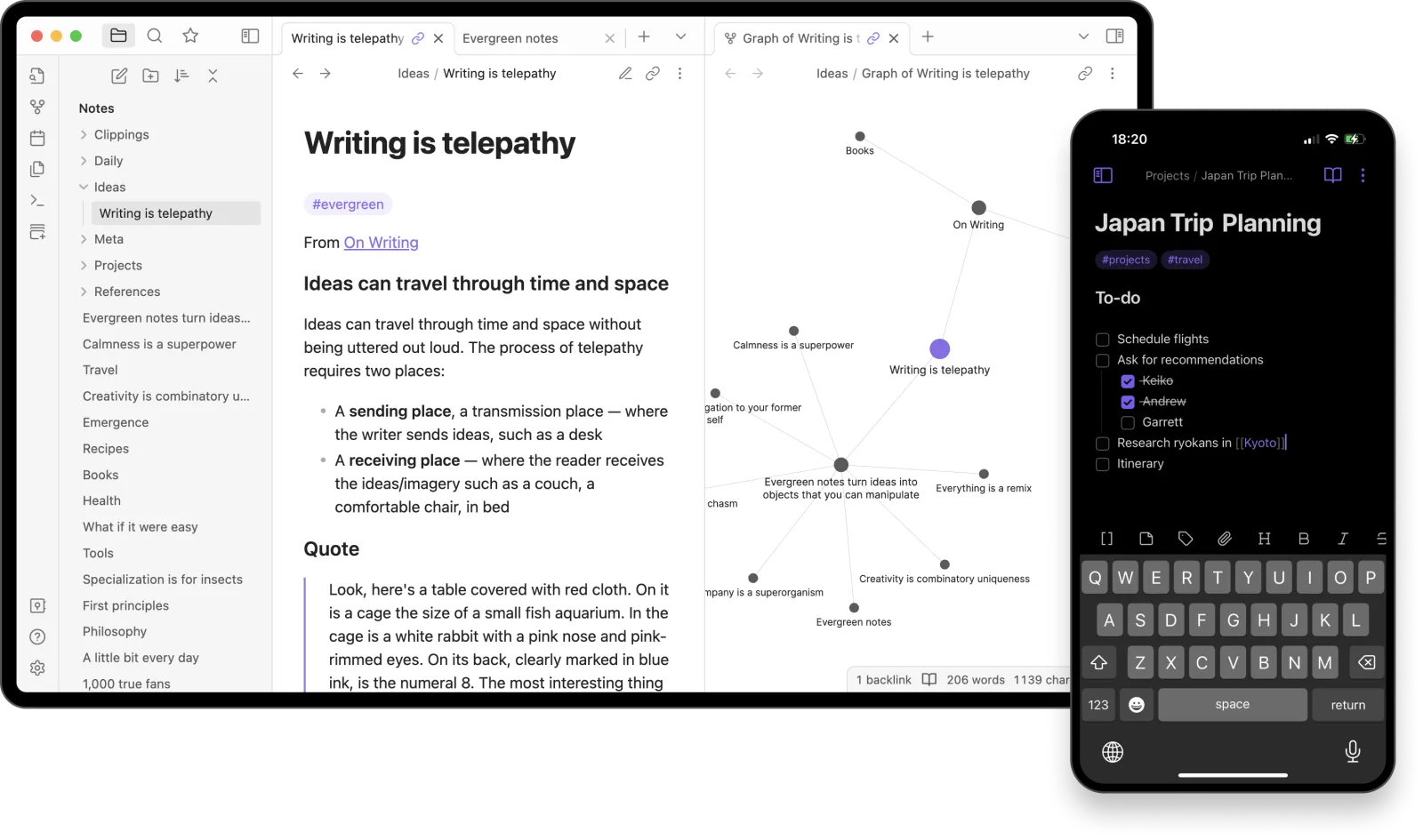
Obsidian is still the best notes choice here for people who care more about ownership and thought structure than convenience. Your notes stay as local Markdown files, which means no proprietary lock-in and excellent offline reliability.
That local-first model matters more in 2026 than it did a few years ago, because many note apps now push cloud AI features and heavier collaboration layers by default. Obsidian goes the other direction: your files, your vault, your rules. I would still not recommend it to someone who just wants a shared team wiki, but for study systems, research, writing, and personal knowledge management, it remains one of the strongest Mac options.
Key Features & User Experience
- Local-First Markdown: Your notes are plain files on disk — no proprietary format, full ownership.
- Bidirectional Links & Graph View: Connect ideas across notes and visualize relationships.
- Massive Plugin Ecosystem: 1,500+ community plugins for almost any workflow.
- Canvas: Infinite canvas for spatial thinking, connecting notes, images, and web content.
- Obsidian CLI: Automate vault operations from the terminal (new in 1.12).
Pricing: Free for personal use. Sync at $5/month. Publish (hosted site from your notes) at $8/month. Commercial license at $50/user/year.
| Pros | Cons |
|---|---|
| Complete data ownership with local Markdown files | Steeper learning curve than simpler note apps |
| Unmatched extensibility via community plugins | Sync requires paid add-on or third-party setup |
| Free for personal use with no feature gating | No real-time collaboration (single-user by design) |
| Works offline — no internet connection required | Mobile app is less polished than the desktop experience |
Visit the Obsidian website
10. Bear
 Screenshot: Mac App Store, July 2026
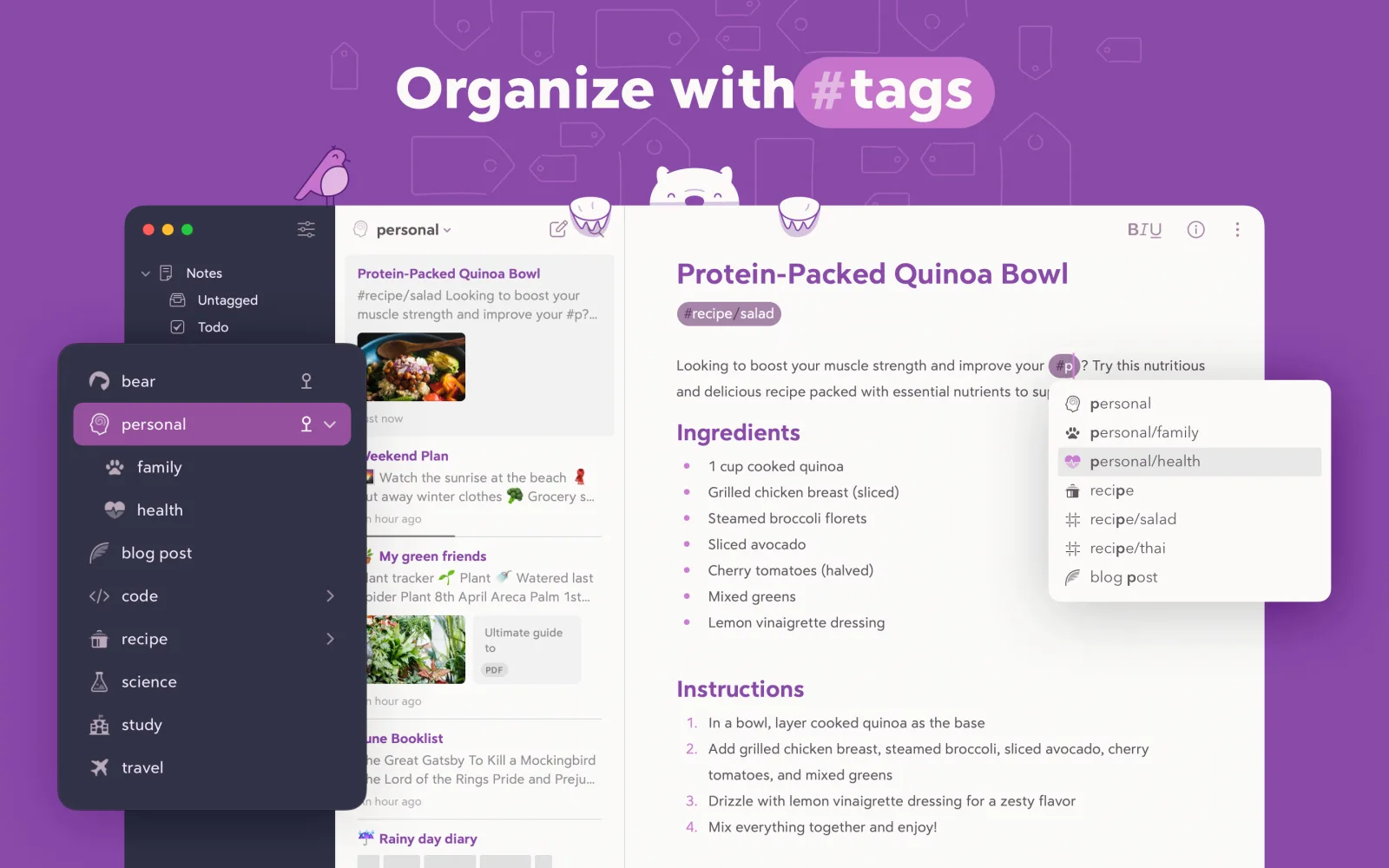
Bear is still the most pleasant writing environment on this list. It is not trying to be your team workspace or your everything app. It is trying to make writing and note capture feel light, fast, and attractive on Apple devices, and it succeeds.
That narrowness is the point. Bear works best for writers, students, and solo users who want a lower-maintenance notes app than Obsidian and a cleaner one than Notion. Its weakness is also obvious: once you want collaboration, web access, or database-style structure, you will outgrow it.
Key Features & Use Cases
- Beautiful Writing Experience: Distraction-free editor with inline Markdown rendering and multiple themes.
- Nested Tags: Organize notes with hashtag-based tags (e.g., #work/projects) instead of folders.
- Encrypted Notes: Encrypt individual notes including all attachments for sensitive content.
- iCloud Sync: Fast, reliable sync across Mac, iPhone, and iPad.
- Flexible Export: Export to Markdown, PDF, HTML, DOCX, and plain text.
Pricing: Free with basic features. Bear Pro at $2.99/month or $29.99/year (includes sync, themes, and export).
| Pros | Cons |
|---|---|
| Gorgeous, focused writing experience | Apple-only — no Android or Windows app |
| Simple, intuitive tagging replaces rigid folder systems | Pro subscription required for sync and advanced export |
| Very affordable compared to competitors | Not designed for team collaboration |
| Lightweight and fast even with thousands of notes | No web app or browser access |
Visit the Bear website
11. Rectangle
 Screenshot: rectangleapp.com, July 2026
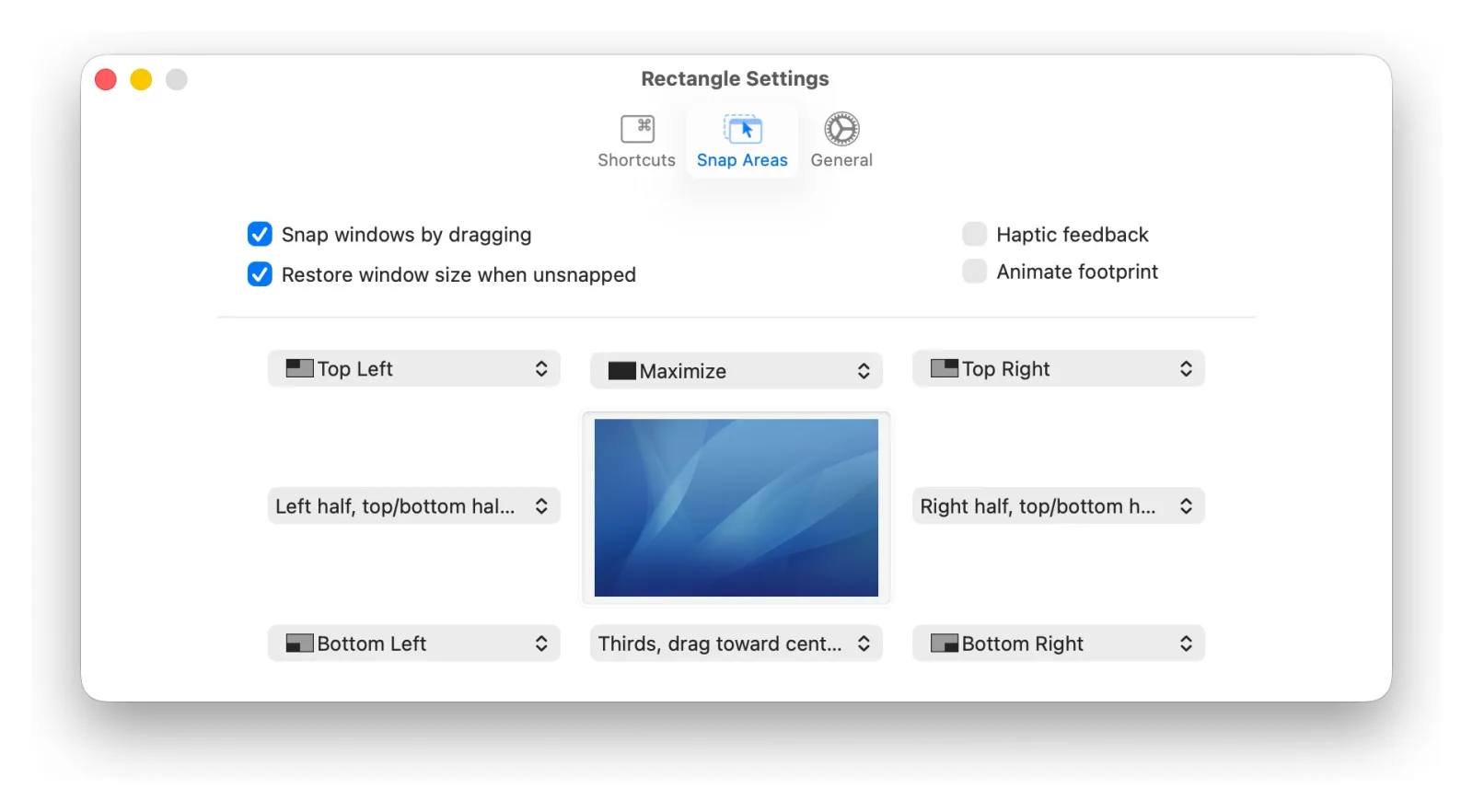
Rectangle is the essential window management tool that every Mac user should install. It brings keyboard-driven window snapping, tiling, and resizing to macOS — functionality that many users feel should be built into the system. Drag a window to the edge of the screen to snap it into position, or use keyboard shortcuts to instantly tile windows into halves, thirds, quarters, or custom layouts.
The free version (open source) covers the core snapping and shortcut features. Rectangle Pro adds advanced capabilities like cursor-based gestures, trackpad gestures, custom snap areas, application-specific layouts, and the ability to resize adjacent windows simultaneously.
Key Features & User Experience
- Keyboard Shortcuts: Snap windows to halves, thirds, quarters, or custom positions with hotkeys.
- Drag-to-Snap: Drag windows to screen edges or corners for instant tiling.
- Multi-Monitor Support: Seamlessly move and resize windows across multiple displays.
- Custom Snap Areas (Pro): Define exact screen regions for precise window placement.
- Application Layouts (Pro): Save and restore window arrangements for specific workflows.
Pricing: Rectangle (free, open source). Rectangle Pro at $9.99 one-time purchase.
| Pros | Cons |
|---|---|
| Free version covers everything most users need | macOS Sequoia added native tiling (basic overlap) |
| One-time purchase for Pro — no subscription | Pro features may be unnecessary for casual users |
| Open source with active community development | No cross-platform version for Windows/Linux users |
| Lightweight with no noticeable performance impact |
Visit the Rectangle website
12. 1Password
 Screenshot: 1password.com, July 2026
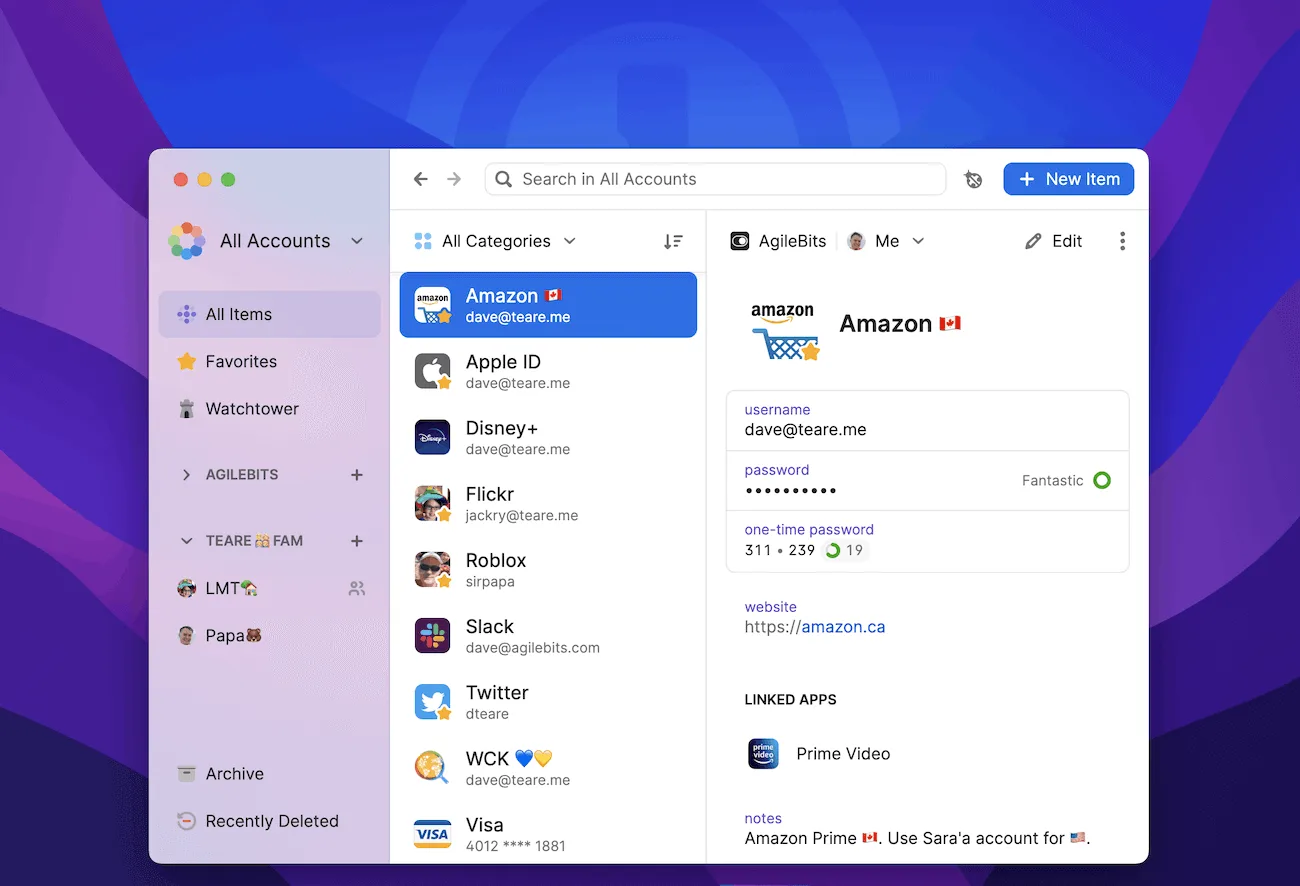
1Password earns its place because secure sign-ins are still a daily productivity issue, not just a security issue. A password manager that works smoothly inside macOS saves time every day and removes a surprising amount of friction from browser and app logins.
It remains the strongest overall choice for Mac users who want polished autofill, passkeys, developer-friendly tools, and reliable cross-device sync. I also give it credit for continuing to improve passkey handling and access behavior rather than treating them as side features; the official release notes are worth checking if these details affect your workflow.
Key Features & User Experience
- Universal Autofill: Fill passwords and one-time codes across browsers and native Mac apps.
- Watchtower: Monitors for weak passwords, reused credentials, breached accounts, and expiring 2FA.
- Passkey Support: Create and sync passwordless logins across Mac, iOS, and Windows.
- Developer Tools: Built-in SSH agent, CLI, and API token management.
- Secure Sharing: Share individual items or entire vaults with family or team members.
Pricing: Individual at $3.99/month (billed annually). Families (up to 5 members) at $6.99/month. Teams and Business plans available. Note that 1Password raised prices in March 2026, so older reviews still quote the lower $2.99 rate.
| Pros | Cons |
|---|---|
| Best-in-class macOS and browser integration | No free tier (14-day trial only) |
| Passkey and SSH key management in one app | Subscription-only — no one-time purchase option |
| Watchtower proactively identifies security risks | Family plan limited to 5 members |
| Touch ID and Apple Watch unlock for fast access |
Visit the 1Password website
What Changed in 2026
This is the part most yearly list updates skip. Not every product change deserves a rerank, but a few 2026 checks did affect how these apps compare on Mac.
- 1Password: Prices went up on renewals from late March 2026: Individual moved from $2.99 to $3.99 per month and Families from $4.99 to $6.99. It is still the easiest password manager to recommend on Mac, but the value question is sharper now. Effect on ranking: unchanged in quality, slightly weaker on price.
- Raycast: Raycast 2.0 entered public beta in May 2026 and the launcher now runs on Windows (still in beta). The Raycast pricing page keeps the free plan strong while reserving AI and cloud features for paid users. Effect on ranking: improves; the free tier remains the best value in the launcher category.
- Notion: Custom Agents left free beta in May 2026 and are now usage-billed on Business and Enterprise plans. The Notion pricing page keeps Business at $20 per seat. Effect on ranking: no major drop, but the AI value now depends heavily on which plan you are on.
- macOS 27 “Golden Gate” (WWDC, June 2026): the next macOS drops support for Intel Macs entirely, so this is the year Intel holdouts should favor apps with light system requirements. Apple also pushed deeper AI into the system. None of the 12 picks here lose compatibility on Apple silicon.
- Things: No dramatic pricing shift or product repositioning changed the recommendation. In a category full of AI expansion and subscription creep, Things still offers a clean, focused Apple-only task manager with a one-time purchase. Effect on ranking: unchanged.
- Rectangle: Native macOS tiling is better than it used to be, which weakens the “must-have” case for casual users. But Rectangle still offers far better keyboard control and layout flexibility. Effect on ranking: unchanged for power users, slightly weaker for casual users who only need basic snapping.
- Chronoid: The broader 2026 market is moving toward apps that combine planning, visibility, and focus protection rather than treating them as separate chores. That trend is exactly why Chronoid remains first on this list: it connects tracking with action instead of making you assemble a stack from scratch. Effect on ranking: unchanged at #1.
The wider takeaway from these 2026 Mac app updates is that rankings changed less because of flashy redesigns and more because of pricing boundaries, AI usefulness, and whether focus features are built in or bolted on.
We re-checked pricing pages and release notes for all 12 picks again in August 2026, and the rankings hold: no pricing or macOS compatibility change since would move any app up or down. Raycast 2.0, which entered public beta in May, remains the launcher release to watch on both macOS and Windows.
We also published a separate list of the best Mac apps for developers, covering terminals, AI code editors, git clients, and API tools. If you write code for a living, that list goes deeper on developer tooling than the general picks here.
The next full re-rank is planned for when macOS 27 ships this fall, since Intel support ends with that release.
If your priority is understanding where your time goes on Mac without managing manual timers, Chronoid is the strongest fit on this list.
See why Chronoid wins for automatic tracking Download Chronoid
Frequently Asked Questions About Mac Productivity Apps
What is the best productivity app for Mac?
If you want one app that improves awareness and focus immediately, Chronoid is the strongest single pick because it combines automatic tracking, private insights, and focus tools. If your main need is planning and knowledge management instead, Notion, Things, and Obsidian are better specialized choices.
What are the best free productivity apps for Mac?
Notion, Raycast, Todoist, Obsidian, and Rectangle are the strongest free or free-tier options on this list. They cover planning, launching, note-taking, task management, and window control without requiring an upfront purchase. If tracking your hours is the priority, we also compared 11 options in our best free time tracking software guide. If note-taking is your main priority, this roundup from more from Whisper AI is also useful because it focuses specifically on note apps rather than broader productivity stacks.
Which Mac productivity apps are worth paying for?
The easiest paid recommendations to justify are Chronoid for automatic time visibility, Alfred Powerpack for workflow speed, Things for task management, and 1Password for secure credential management. They each solve a high-frequency problem well enough to earn a permanent place in a Mac workflow.
What is the best Mac app for staying focused?
If staying focused is the priority, Chronoid is the best overall choice here because it combines a website blocker, Pomodoro timer, and automatic activity tracking. That gives you both prevention and feedback, instead of forcing you to guess where your attention went. If you want a dedicated blocker instead of an all-in-one app, we compared 10 of them in our distraction blocker guide.
Things vs Todoist on Mac
For many solo Mac users, yes. For mixed-device users and teams, no.
Things is better if you live mostly inside Apple devices and want the cleanest task experience on Mac. It launches fast, feels native, and keeps daily planning calm instead of crowded. I would choose Things for personal work, writing projects, and any setup where a Today view and quick capture matter more than collaboration.
Todoist is better if your work spans Mac, browser, phone, and non-Apple hardware. It is easier to recommend for shared projects, recurring work, and people who need their task list available everywhere. It also has a gentler path for teams, because collaboration is built in rather than absent.
The clearest workflow difference showed up during task capture and review. In Things, capturing a task and sorting it into Today, Upcoming, or a project felt faster and calmer, especially for solo planning. I could brain-dump a list, assign a few headings, and get to a readable daily view with very little friction. Todoist was better when that same task list needed labels, shared ownership, or access from a browser later in the day. In other words, Things reduced planning noise on Mac, while Todoist reduced system risk once work moved across devices and people.
Integration limits matter too. Things works well with Apple-centric workflows like Shortcuts, Reminders import, and Apple device sync, but it deliberately avoids becoming a broad collaboration hub. Todoist has the opposite advantage: it is easier to plug into a mixed stack through its integrations and automation options, so it fits better when tasks need to connect with outside tools or teammates. That flexibility comes with more interface weight. On Mac, Todoist felt more utilitarian, while Things felt more refined.
There is also a user-experience tradeoff around maintenance. Things asks less of you after setup because the system is narrower and the interface makes fewer decisions feel complicated. Todoist asks for more sorting discipline once projects, labels, filters, and shared spaces grow. But that extra structure is exactly why it scales better for work that changes context often. If you mostly manage your own priorities on Apple hardware, Things is easier to stick with. If your tasks cross operating systems, browsers, and collaborators, Todoist is usually the safer long-term choice.
Here is the practical split:
| Choose | If this sounds like you |
|---|---|
| Things | You want the best native Mac experience, do not need a web app, and prefer one-time purchases over subscriptions |
| Todoist | You need cross-platform access, shared projects, and flexible collaboration without being locked to Apple devices |
The tradeoff is style versus reach. Things feels better on Mac. Todoist fits more lives. If you are comparing the best productivity apps for macOS 2026 for personal use, Things has the edge. If you are comparing what will still work when your workflow leaves the Mac, Todoist is safer.
How to Build Your Ultimate Mac Productivity Stack
The smartest way to build a Mac workflow in 2026 is not to install every popular tool. It is to combine a few apps that cover different jobs with as little overlap as possible. The strongest stacks I tested had four layers: visibility, planning, knowledge, and speed.
A simple version looks like this:
- Visibility: Chronoid
- Planning: Things or Todoist
- Knowledge: Obsidian, Bear, or Notion
- Speed layer: Raycast or Alfred
That pattern matches what broader 2026 productivity coverage is showing: one app rarely does everything well, and layered stacks usually work better than all-in-one promises, as also reflected in Flowlu’s 2026 guide.
Best stack for MacBook Air vs MacBook Pro/Desktop Macs
If you are comparing the best apps for MacBook Air 2026 with heavier desktop-style setups, the right stack changes.
Lean stack for MacBook Air users
MacBook Air users should bias toward apps that launch quickly, use modest memory, and do not require heavy always-on syncing.
Best fits from this list:
- Things: fast, low-overhead, and ideal for personal task management.
- Bear: lightweight note-taking with very little setup friction.
- Rectangle: tiny footprint, immediate benefit, minimal background cost.
- Chronoid: strong if you want background tracking, but still more justified when insight and focus are core needs.
- Alfred: excellent for speed without the feeling of running a heavier workspace app.
For a MacBook Air, I would avoid stacking several constantly running, cloud-heavy tools unless you really need them. A lean setup like Things + Bear + Rectangle + Alfred feels especially good on lower-memory machines because each app becomes useful quickly and does not demand much maintenance.
Heavier stack for MacBook Pro or desktop Macs
If you use a MacBook Pro, Mac mini, or desktop Mac with more memory and a more complex workflow, heavier tools make more sense.
Best fits from this list:
- Notion: better when your work involves docs, dashboards, and databases.
- Raycast: excellent for command-heavy workflows and extensions.
- Chronoid: strong for tracking, reports, and focus analysis over long workdays.
- OmniFocus: best when you need a deep planning system.
- 1Password: useful everywhere, especially when your work spans many tools and logins.
A practical pro-level stack is Chronoid + Raycast + Notion + 1Password, with Todoist or OmniFocus depending on how formal your task system needs to be.
Start with the bottleneck, not the trend
The simplest way to choose from the best productivity apps for MacBook 2026 is to start with the part of work that is currently failing.
- If you lose time without noticing, start with Chronoid.
- If you know what to do but struggle to execute quickly, start with Raycast or Alfred.
- If your tasks are scattered, start with Things, Todoist, or OmniFocus.
- If your notes are a mess, start with Bear, Obsidian, or Notion.
- If you finish weeks unable to say what you shipped, pair any of these with a daily work journal.
That sequence matters. In my testing, users got more value from solving one visible problem thoroughly than from building a “perfect” system all at once. For a deeper look at planning tradeoffs, our time management software comparison is a useful next step, and if you want picks that work beyond the Mac, see the best time management apps roundup.
For Mac users who want access to multiple premium apps through a single subscription, services like Setapp offer curated Mac software for a monthly fee, which can be more cost-effective than buying individual licenses.
If you want a Mac productivity app that helps you see where your time goes, spot distractions, and protect focused work, start with Chronoid.
Read the Chronoid breakdown Download Free Trial